Hi
From below topic, we can use “Row Span” to merge or unmerge repeated values in the outer dimensions when you have stacked dimensions on rows, but is there same setting in cube-viewer?
Grid Widget - Merge Cells - Apliqo UX - Cubewise Forum
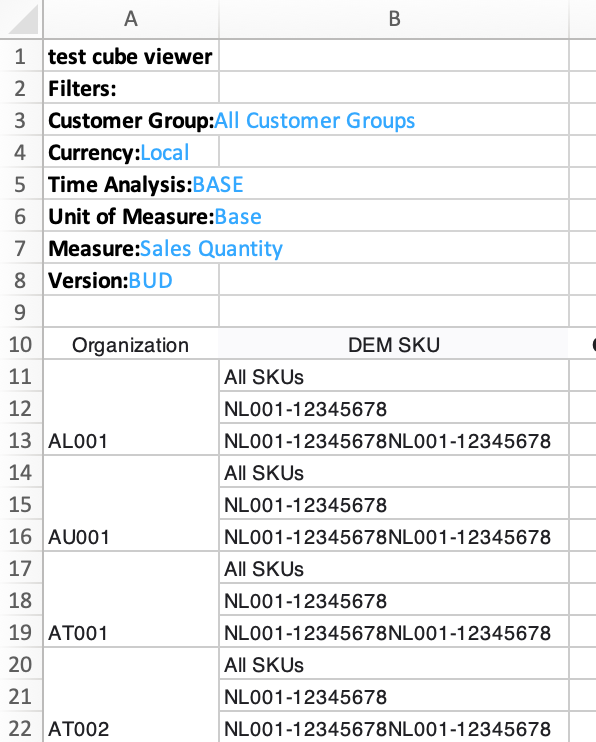
Another question: in Cube-viewer, it will automatically merge repeated values in the outer dimensions, but when exporting to excel, it will merge too, is there possible to export to excel with unmerge?
Once you have the file in Excel you can easily select the column and unmerge cells. Therefore I’m not really convinced that this is needed as a configuration option in the UX export.
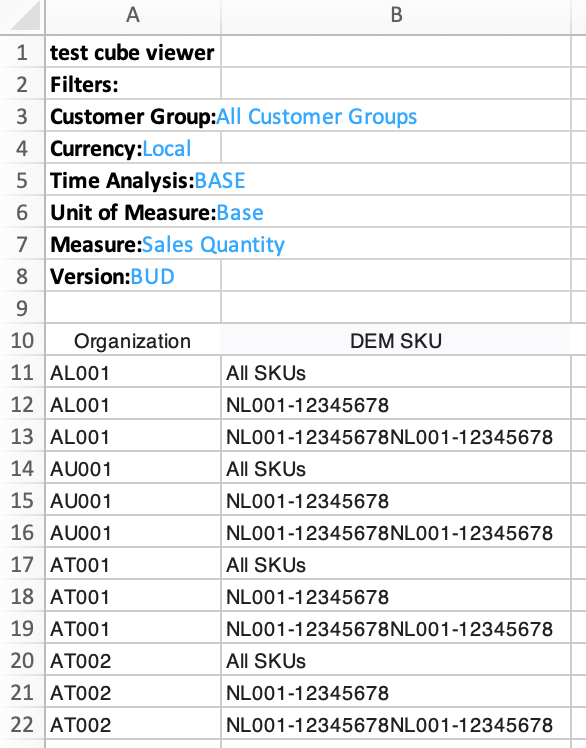
Hi @cw-ch-scott we are looking for a ‘repeat row labels’ option, or a way to stop the rowspan in the cubeview, like you can in a table widget. It would be great if this was either a display or export option as it makes subsequent analysis (e.g. pivot tables) in Excel easy. Otherwise, a user has to unmerge the cells and manually fill the row labels.
Thanks for the info. I would have assumed that the row header values would have still been stored in the individual cells and on unmerging would have already been populated correctly. If that isn’t the case then I can see that exporting to Excel without the option to export without row span would be annoying. We will check if he same behaviour exists in the current version. If it does it will be fixed there. It won’t be addressed in the legacy product.
I have checked this out in 2026.02-beta and there the behaviour is if a table or cube view is exported with row span enabled then the row header values are actually there in the (merged) cells. So upon unmerging the table is as the user would expect it if wanting to do further work e.g. add DBRW formulas, use as pivot table source, etc.
So my feedback is this is already fixed in the new version of UX. Recommended action, upgrade.