Hi All,
I would like to share with you the load balancing architecture of UX NextGen.
The entire framework has been implemented in my own test environment.
The following is the diagram of the architecture.
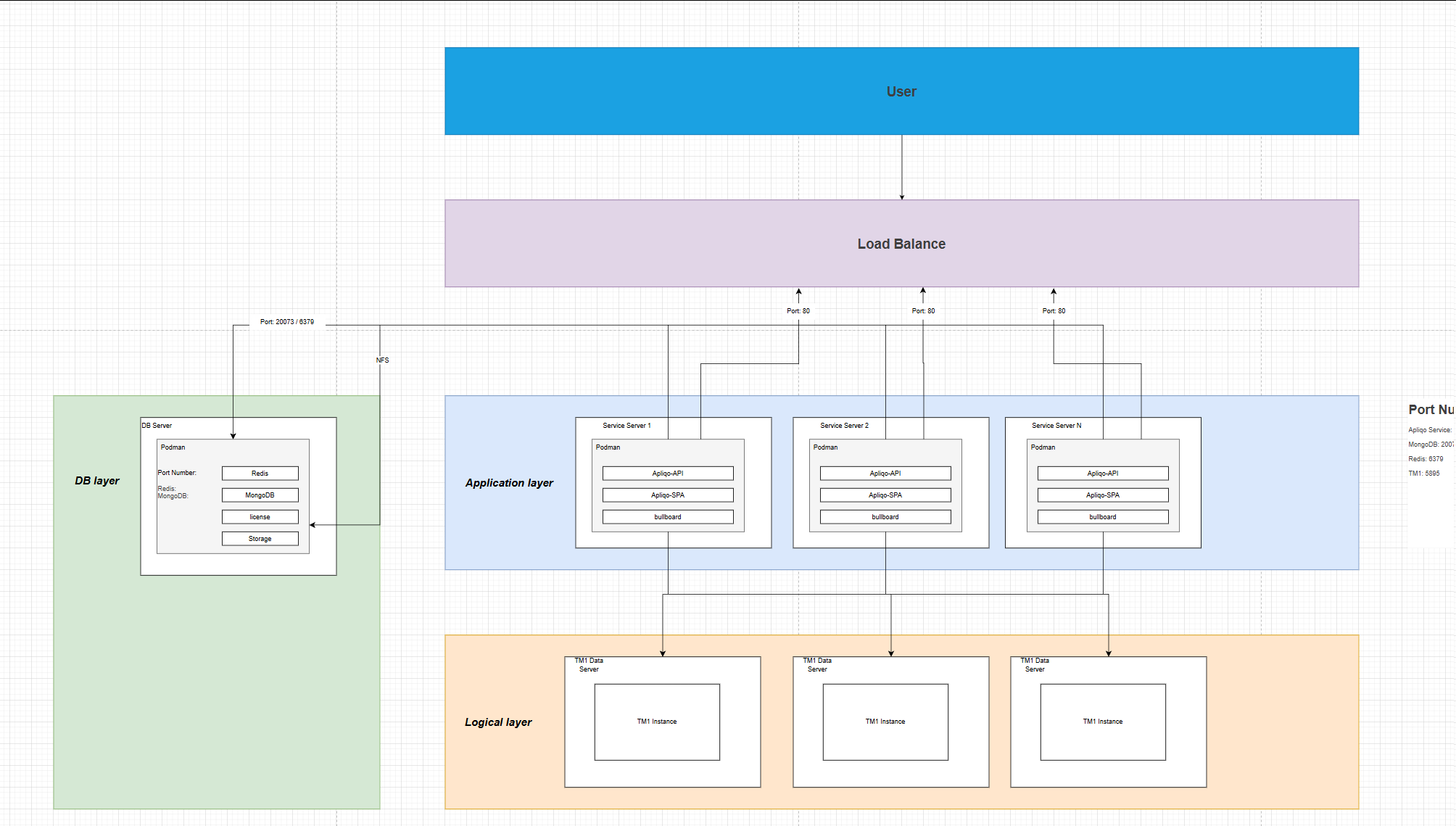
Why is a load balancing architecture necessary?
- Load balancing mainly addresses the performance issues at the application service level, reducing the occurrence of server crashes caused by an excessive number of users or too many requests(In fact, the demand comes from a client with over a thousand users. The implementation of load balancing is their essential requirement.).
- DB is isolated from applications to prevent the situation where the failure of one application service leads to the collapse of all application services.
Preparatory work:
- Three(At least) servers running CentOS 8+, One is for DB, and two are for the application;
- Install Podman and Podman-compose(The official IBM documentation states that Docker will no longer be supported on RHAL, and Podman will be used by default, and Podman is free to use and does not require the purchase of a license.);
- All three servers have nfs-utils installed;
- Install Nginx as the application for load balancing.
- Download the Linux version UX NextGen package from the Apliqo official website
Modification of the docker-compose.yml file
Because the compose file of Podman is different from that of Docker, there are certain parts that need to be modified.
Additionally, since the DB and UX applications are installed on separate servers, all the DB HOSTs need to be modified to the corresponding IP addresses(I wrote it in the .env file as a parameter to be called.)
networks:
  apliqo-core:
    external: true

volumes:
  apliqo-mongo:
    name: apliqo-mongo-store
  apliqo-redis:
    name: apliqo-redis-store

services:
  apliqo-mongo:
    container_name: apliqo-mongo
    image: mongo
    restart: always
    networks:
      - apliqo-core
    volumes:
      - apliqo-mongo:/data/db
    ports:
      - ${MONGO_DB_PORT_EXPOSE}:27017
    environment:
      MONGO_INITDB_DATABASE: ${DB_NAME}
      MONGO_INITDB_ROOT_USERNAME: ${DB_USER}
      MONGO_INITDB_ROOT_PASSWORD: ${DB_PASSWORD}

  apliqo-api:
    container_name: apliqo-api
    image: apliqo/api:latest
    restart: always
    networks:
      - apliqo-core
    command: node ./dist/src/main.js
    volumes:
      - ./.env:/usr/src/app/.env:Z
      - ./license:/usr/src/app/license:Z
      - ./storage:/usr/src/app/storage:Z
    ports:
      - ${PORT_EXPOSE}:${PORT}

  apliqo-spa:
    container_name: apliqo-spa
    image: apliqo/spa:latest
    restart: always
    depends_on:
      - apliqo-api
    networks:
      - apliqo-core
    environment:
      - APLIQO_SERVER=http://apliqo-api:${PORT}
    ports:
      - 80:80
    volumes:
      - ./styles:/usr/src/app/styles:Z


  apliqo-redis:
    image: redis
    container_name: apliqo-redis
    restart: always
    networks:
      - apliqo-core
    volumes:
      - apliqo-redis:/data
    ports:
      - 6379:6379

  bullboard:
    container_name: bullboard
    image: deadly0/bull-board
    restart: always
    networks:
      - apliqo-core
    ports:
      - 5555:3000
    environment:
      REDIS_HOST: ${REDIS_HOST}
Modify the content of the .env file
Including: DB_HOST, DB_PORT, REDIS_HOST
# Server Configuration
PORT=4000
PORT_EXPOSE=4000
JWT_SECRET=<JWTSECRET>
## Password for "service-admin" default user
SERVICE_USER_PASSWORD=<serviceAdminPassword>


# Mongo Db Configuration
DB_NAME=apliqo-content-store
DB_HOST=<DBServerIP>
DB_PORT=27032
MONGO_DB_PORT_EXPOSE=27032
DB_USER=root
DB_PASSWORD=<DBpassword>
DB_CONNECTION_SCHEME=mongodb
DB_AUTHSOURCE=admin

# Redis Configuration
REDIS_HOST=<DBServerIP>

# TM1 Configuration
## Set to 1 if you have self-signed certificate for TM1 Server
TM1_VERIFY_SSL=0

APLIQO_HOSTNAME=
FRONTEND_LOCAL_URL=http://host.docker.internal:80

SMTP_HOST=
SMTP_PORT=
SMTP_USER=
SMTP_PASSWORD=
# Email From for SMTP Distribution
SMTP_EMAIL=

# only for 465 port (0 or 1)
SMTP_SSL=
Install the NFS service
The DB server is used as the main server for the NFS service, so the NFS service needs to be started on the DB server.
NFS sharing is implemented to enable the sharing of files uploaded by Storage and License functions to other application services.
sudo yum install nfs-utils          # CentOS/RHEL

sudo chmod 777 DBServer/path/to/license # Or set appropriate permissions
sudo chmod 777 DBServer/path/to/storage # Or set appropriate permissions

# edit exports file
sudo vim /etc/exports

# add content below
path/to/license AppServerIP1(rw,sync,no_subtree_check,no_root_squash)
path/to/license AppServerIP2(rw,sync,no_subtree_check,no_root_squash)
path/to/storage AppServerIP1(rw,sync,no_subtree_check,no_root_squash)
path/to/storage AppServerIP2(rw,sync,no_subtree_check,no_root_squash)


# run command
sudo exportfs -ra
sudo systemctl restart nfs-server
Mount NFS on the other two application servers:
sudo yum install nfs-utils    # CentOS/RHEL

# mount NFS share
sudo mount -v -t nfs DBServerIP:/DBServer/path/to/storage /AppServer/path/to/storage
sudo mount -v -t nfs DBServerIP:/DBServer/path/to/license /AppServer/path/to/license

# test mount
df -h | grep nfs

# set auto load mount
echo "DBServerIP:/DBServer/path/to/license /AppServer/path/to/license
 nfs defaults 0 0" | sudo tee -a /etc/fstab
echo "DBServerIP:/DBServer/path/to/storage /AppServer/path/to/storage
 nfs defaults 0 0" | sudo tee -a /etc/fstab
Installation of the DB server
login docker.io with command line:
podman login -u apliqocustomer -p docker.io
On the DB server, only Redis and MongoDB need to be installed.
I modified the official apliqo.sh installation script. By using the command “./apliqo.sh install db”, it is possible to install only Redis and MongoDB.
Installation of the Application server
login docker.io with command line:
podman login -u apliqocustomer -p docker.io
On the application server, only Apliqp-api and Apliqo-spa and bullboard need to be installed.
I modified the official apliqo.sh installation script. By using the command “./apliqo.sh install service”, it is possible to install only Apliqp-api and Apliqo-spa and bullboard.
Configure Nginx load balancing
Nginx config file sample
http {
    upstream backend {
        least_conn;
        server AppServerIP1:80;
        server AppServerIP2:80;
    }

    server {
        listen 80;

        location / {
            proxy_pass http://backend;
            proxy_set_header Host $host;
            proxy_set_header X-Real-IP $remote_addr;
        }
    }
}
Testing and Verification
- open ux nextgen with URL: http://AppServer1:80, Create any new dashboard, and you should see this dashboard with URL http://AppServer2:80
- open ux nextgen with URL: http://AppServer1:80, Upload any image on storage, and you should see this image with URL http://AppServer2:80
- open ux nextgen with URL: http://AppServer1:80, upload license, and restart apliqo-api on AppServer2 server, and you should see license is available with URL http://AppServer2:80
If you have any questions, feel free to discuss them with me. At present, no other problems have been identified, but I will conduct further tests. 
Finally, I attach the modified apliqo.sh script that I have made.
scripts.zip (10.0 KB)