Hi Team,
We are trying to hide keystore passkey in server.xml file. Is there any option we can do that.
Kindly let know know if anything else is required.
Thank you,
Sweta Kumari
Hi Team,
We are trying to hide keystore passkey in server.xml file. Is there any option we can do that.
Kindly let know know if anything else is required.
Thank you,
Sweta Kumari
Hi @SKUMA251,
Here is what worked for Windows at least. The password is now placed into Windows Registry instead. Here are the steps that I did,
conf/catalina.properties to add the following line,org.apache.tomcat.util.digester.PROPERTY_SOURCE=org.apache.tomcat.util.digester.SystemPropertySource
conf/server.xml as follows,<Certificate
certificateKeystoreFile="conf/TOMCAT.keystore"
certificateKeystorePassword="PulseSecretPassword"
type="RSA" />
So update the above as,
<Certificate
              certificateKeystoreFile="conf/TOMCAT.keystore"
              certificateKeystorePassword="${KEYSTORE_PASS}"
              type="RSA" />
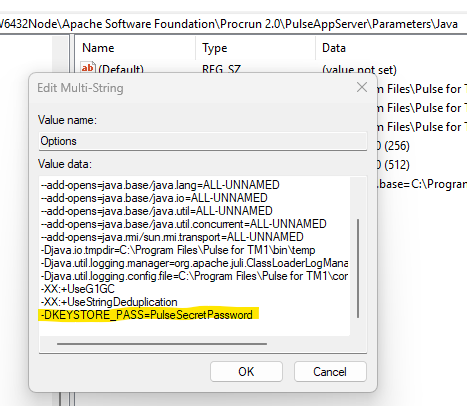
Computer\HKEY_LOCAL_MACHINE\SOFTWARE\WOW6432Node\Apache Software Foundation\Procrun 2.0\PulseAppServer\Parameters\Java
Reference: Updating the Pulse Opensearch JVM maximum memory
And add the following line into Options,
-DKEYSTORE_PASS=PulseSecretPassword
Like as follows,
If the password is correct and all is setup properly, you can now access Pulse via HTTPS. If the password is incorrect, you will not be able to open up via HTTPS at all. So when that happens, double check by hardcoding it into your server.xml file and verify from there that it works (note that you will need to restart Pulse Windows service for the changes to take into effect).
Cheers,
Paul
Thanks @plim ,
The instructions were added to this new article: https://cubewisecare.atlassian.net/wiki/spaces/PIAC/pages/1201438721/Hiding+the+keystore+password+in+Pulse+server.xml
Cheers,
Vincent
Hi Paul,
Thank you for the steps , we are testing above mentioned steps. Will get back to you once our testing is completed.
Thank you,
Sweta Kumari.
Hi Paul,
We tried the same steps in our Windows server and added all the parameters .
But , still its not working as expected.
Thank you,
Sweta Kumari
Hi Paul,
Could you please let us know if this can be implemented or if possible it can be have a working session.
Thank you,
Sweta Kumari