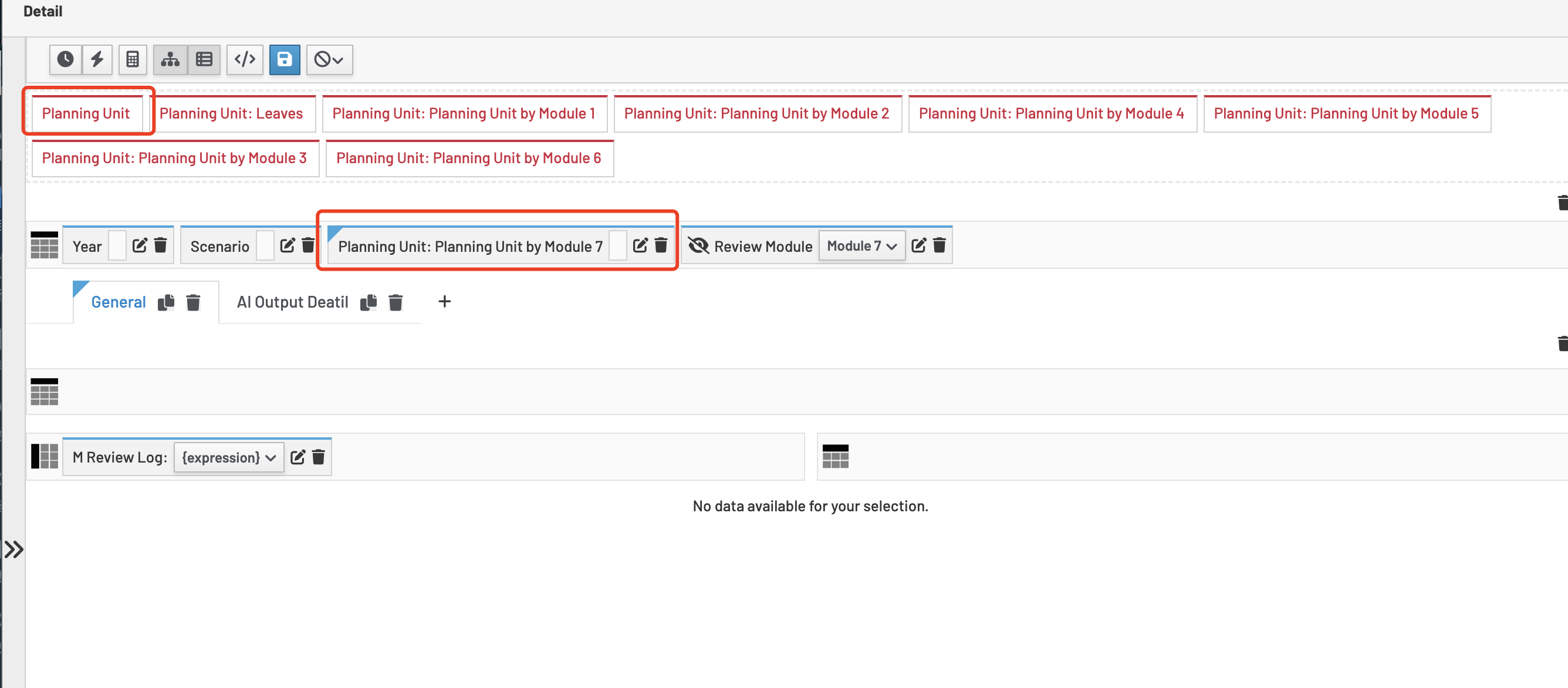
Hi Guys,
Would anyone be able to share how to make a PA hierarchy work with a Textbox? I’ve been trying all night to get the cell content to display, but it’s still not working.

Thanks!
Hi Guys,
Would anyone be able to share how to make a PA hierarchy work with a Textbox? I’ve been trying all night to get the cell content to display, but it’s still not working.
Thanks!
I was trying to figure out what you want to do. The words didn’t make sense, but I think the picture does!
You just want to display the contents of the text from a single cell from one of the rows in the text box??
Text Box widget is different from all other widgets. To work it must have no dimensions on rows or columns. All dimensions must be defined in the cube settings for the widget as filter or fixed. Basically it is a glorified single cell value or DBR formula with text formatting. (In next gen UX this is fixed BTW and the settings are like other widgets and if there are multiple elements on rows or columns then you will just get the first cell but the widget itself will work.)
So all you need to do if put all dimensions on filter. You can then enable hyperlink to change filters in the Planning Unit dimension in the other widget and then you don’t need a widget filter in the text box widget.
Hi Scott,
Thanks for your reply! Let me provide more detail of the case.
Within the pop-up, I simply replace the ‘Planning Unit’ dimension with another hierarchy, and after that, the textbox no longer works as expected. I’m not sure if I missed something.
Compared to other widgets the TextBox is a bit sub-optimal. It can be that it doesn’t support alternate hierarchies. This is fixed in NextGen but it’s unlikely to be addressed in the Angular product.
Thanks
Just in case anyone encounters such case, I would like to share a snippet as a workaround to fix this issue:
<tm1-ui-dbr
    tm1-instance="{{$ctrl.data.instance}}"
    tm1-cube="{{$ctrl.data.cube}}"
    tm1-elements="{{$ctrl.Settings.settings[$ctrl.data.instance+'.Scenario.Scenario']}},
                  {{$ctrl.Settings.settings[$ctrl.data.instance+'.Year.Year']}},
                  {{$ctrl.Settings.settings[$ctrl.data.instance+'.Review Module.Review Module']}},
                  Planning Unit by Module 1::{{$ctrl.Settings.settings[$ctrl.data.instance+'.Planning Unit.Planning Unit by Module 1']}},
                  {{$ctrl.Settings.settings[$ctrl.data.instance+'.AI Ref Type.AI Ref Type']}},
                  String"
    tm1-consol-input="true"
    tm1-format-html="true"
    tm1-ui-class="tm1textboxclass"
    tm1-placeholder="Add info text here..."
    ng-if="!$ctrl.options.textBox.readOnly && $ctrl.finalElementDataList != ''"
    >
</tm1-ui-dbr>
Hope that would help~