Floyd
1
Hello Cubewisers,
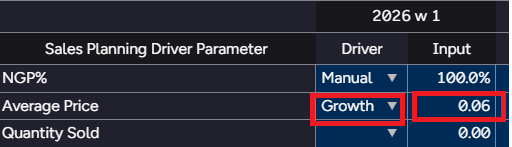
Attempting to format a call based on the driver selection in Apliqo UX (latest version).
For example : for Average Price
Growth = % format
Manual = Manual input.
I know there are some previous topics around this but couldn’t see a solution for this particular instance.
Cheers,
Floyd.
I use the following logic in advanced settings, but this is not the last version of Apliqo so I am not sure if this would work…
"columnFormat": {
  "Input": [
    {
      "dataColumn": "Driver",
      "condition": "==",
      "value": "Growth",
      "numberFormat": "0.00%"
    }
]
Floyd
3
Thanks Gitte, will give it a go!
The main issue on this case is the stacked Year-Week dimension with the Measures, and how to apply it dynamically to each of the period’s measures.
If it was only the measures on Column, it is possible to format based on the Driver column. The advanced setting would look like this:
{
  "columns": [
    {
      "selections": [
        [
          "Input"
        ]
      ],
      "conditions": [
        {
          "value": "Growth",
          "comparisonOperator": "=="
        }
      ],
      "dataReference": "Driver",
      "numberFormat": "#.##0.0%;-#.##0.0%;0.0%"
    }
  ]
}