What would be the recommended approach that an administration team should take when provisioning the latest version of Slice to its global user base? Are there any files within the installation zip folder that can be removed, if Slice connect to a remote ARC server (to ensure the installation package is as small as possible)?
Hi @vbrink ,
If your customer is connecting Slice to a centralized Arc server then they don’t need the arc.exe files in the Slice folder:
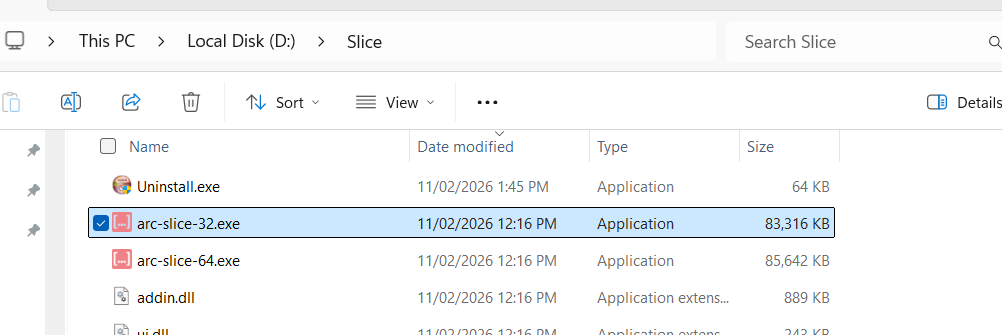
If you remove these two files, you’ll save 2*80 MB.
Could you please confirm this?
Cheers,
Vincent
Hi @vbrink ,
For a procedure on pushing Slice upgrades to all users, Slice has a silent install option, you just need to use the “/S” parameter.
So IT can create a simple script to push it to all their users, normally during start-up, login on Windows (So excel is likely closed and there is no issues during the process).
If Slice previous version is already installed, do a Uninstall command first, then install the latest version.
For uninstalling, point the script to the “Uninstall.exe” and use the /S
To install, may be easier to place the unzipped Installer on a Temp shared drive, so the script can access it without needing to push it to local machine, then do the “Slice installer.exe”, and use the /S
For settings, If it is a new user, you can configure one PC manually via the Slice UI, then copy the desktop.yml file from %appdata%/ArcForTM1 and distribute it to other users on the same folder.
You can set all the settings for the user beforehand, the main parameters to be set for a Central ARC Server is: “IsRemoteUrl” set to True, “URL” and “UrlInUse” set with the ARc Server URL.
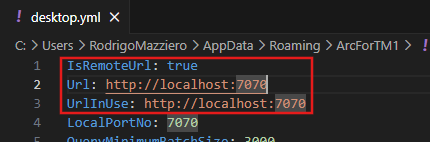
See below the example on executing the Silent uninstall and install. (if executing via Powershell remember add the & at the beginning.)

Hope this helps!
Rodrigo
Arc executables can be removed from Slice directory. Just make sure you don’t try to start local Arc from Slice in this case.
Thank you for the feedback @Vincent @rmazziero @aeremenko
Appreciate the quick responses!