Hi CODE team
I used to have Arc running as a Windows service (manually created), and then Slice dlls in a separate folder to toggle between Slice and PAfE.
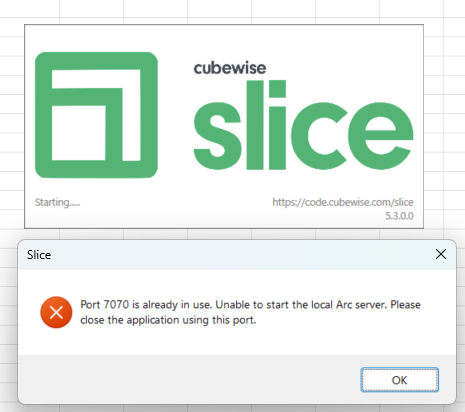
I recently downloaded and installed both Arc 5.3.0 and Slice 5.3.0, trusting that the same configuration as above would work. Now when trying to connect to the Server Explorer, I receive the following error in Slice.
Port 7070 is being used by my Arc Windows service. And it seems that the latest version of Slice is trying to create another Arc local server, which results in the above conflict.
How should we go about installing Arc, running it as a Windows service, and being able to dynamically switch between Arc and PAfE dlls?
You can’t run more than one instance of Arc on the same machine with the same port number (or any other web-based software for that matter).
Slice starts a local server by default when it’s first started, hence the clash with your Windows Service. You need to set Slice to “Connect Remotely” and provide an Arc url to prevent Slice from starting the local server.
Can you get to the settings to change that? If not, try stopping your Windows Service temporarily while you change the settings.
If you want to be able to switch between both modes, you could also consider using a different port number for your Windows Service. You can do that by setting portno: 7071 in the settings.yml in the same folder as your Arc executable.
Thank you @harvey
I was able to change the Slice settings to connect remotely while the Arc service was stopped.
Question on the URLs to configure in Slice - What would be the syntax if I want to connect Slice remotely to more than one Arc environment?
What would you expect Slice to do if connected to more than one Arc instance?
Slice uses Arc’s user interface, it can only show one at a time. It could potentially switch between connections like Server Groups – but it supports Server Groups via Arc already.
Can you give me an idea of the use case you’re looking at?
My ask would be 2-fold:
DEV and UAT environments are configured with multiple Server Groups on a single Arc instance. PRD environment is also configured with multiple Server Groups on another Arc instance (Server Groups are used to keep track of the 140+ TM1 instances running on these environments). Should users manually switch the connection URL between DEV/UAT and PRD environments when wanting to work in one or the other?
We are connecting to our UKLabs environment for demo models (remote connection), but we also need to connect to local instances running (for training, configuration and ad-hoc analysis). Is there a way to keep both remote and local connections, or should we manually change the settings in Slice?
Hi @vbrink ,
One Slice can connect to only one Arc URL at a time. To switch from DEV Arc to PROD Arc, you need to go to Slice Settings and update the Arc URL.
Cheers,
Vincent
Thanks @Vincent
This answers both questions.