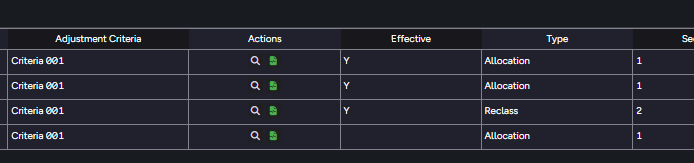
For this, I think you would have to do custom CSS classes and conditional formatting on the action column, to display/hide the button depending on the type.
Don’t think that would be possible out of the box.
To keep it simple, it is probably better having as 2 action columns, one for Allocation and one for Reclass, the user them simply go on the one they need.
Still, if you would like go the custom way, to do exactly as you want.. You can create the second pop-up, and the custom css classes based on the button title, and use the “display: none” on each to hide the “Reclass” or “Allocation” depending on the Type column.
The CSS would look something like the below:
Note: in the CSS, the custom class name must to start with “fill-”, as UX adds this automatically when trying to apply it, at least it is like this currently in version 2025-11.
.fill-hide-popup > div > button[title="Secondpopup"] {
    content: "";
    display: none;
}

.fill-hide-popup-2 > div > button[title="Firstpopup"] {
    content: "";
    display: none;
}
On the Actions column, apply a Column format, with data conditional formatting based on the Type column.
{
  "selections": [
    [
      "Actions"
    ]
  ],
  "fillSettings": {
    "fillColor": "hide-popup"
  },
  "conditions": [
    {
      "value": "Firstpopup",
      "comparisonOperator": "=="
    }
  ],
  "dataReference": "Type"
},
{
  "selections": [
    [
      "Actions"
    ]
  ],
  "fillSettings": {
    "fillColor": "hide-popup-2"
  },
  "conditions": [
    {
      "value": "Secondpopup",
      "comparisonOperator": "=="
    }
  ],
  "dataReference": "Type"
}
Just keep in mind that this a custom approach, so it can be quite hidden and harder for maintenance..
But it should do the trick!
Hope this helps!