I have a requirement to implement dynamic column filtering in my Apliqo report (wizard). When a user selects a month from the context dropdown, the columns should automatically display the current month plus the previous eleven months, creating a trending 12-month view. Both the context and columns use the month dimension. The view must render dynamically without requiring any button clicks or manual actions.
Current Setup:
-
I’ve created attributes on the month dimension to derive the current month and prior 11 months (PreviousPeriod, Previous2Period, Previous3Period… through Previous11Period)
-
These attributes are stored in the }ElementAttributes_month cube
-
For example, when month 202507 is selected: PreviousPeriod=202506, Previous2Period=202505… Previous11Period=202408
Attempted Solutions:
-
MDX with .Properties() function - Attempted to reference attributes directly but columns didn’t render data
-
StrToMember() with Properties() - Tried converting attribute values to member references using the pattern from Apliqo documentation, but data still didn’t display
-
StrToMember() with }ElementAttributes cube reference - Used the syntax: StrToMember("[month].[month].["+[}ElementAttributes_month].([month].[month].[$<<cube.month.month>>], [}ElementAttributes_month].[PreviousPeriod])+"]") for all 12 periods, but no data rendered
-
Hardcoded month values in MDX - Even with static month values like {[month].[month].[202501], [month].[month].[202502]...}, data didn’t display
-
TM1SubsetToSet with dynamic subset - Created a public subset on the month dimension, which worked with hardcoded values but couldn’t make it dynamic based on context selection
Could you please provide guidance on how to achieve this dynamic trailing 12-month requirement? Any sample MDX patterns, configuration examples, or documentation on similar implementations would be extremely helpful.
Environment:
Hi @rkuma145 ,
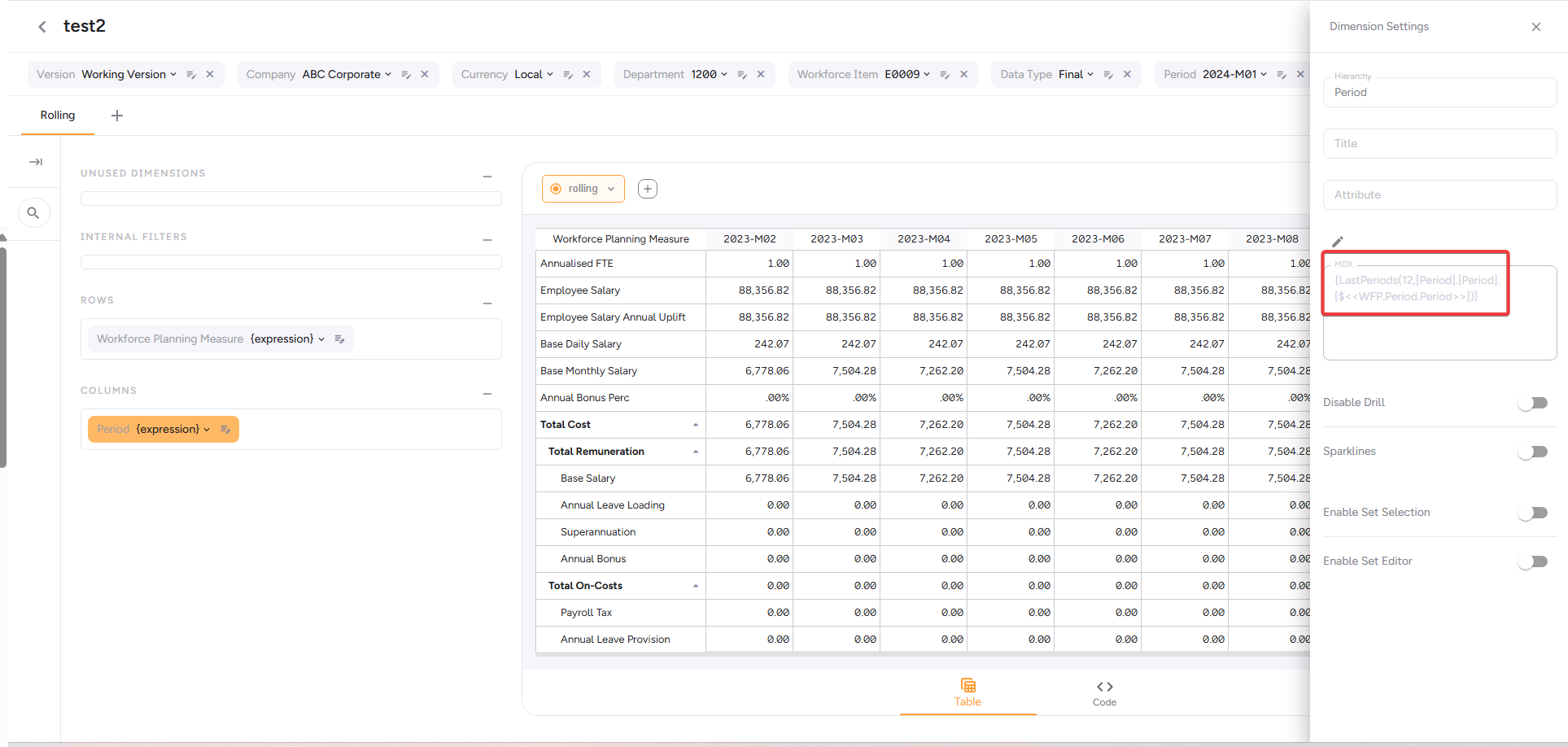
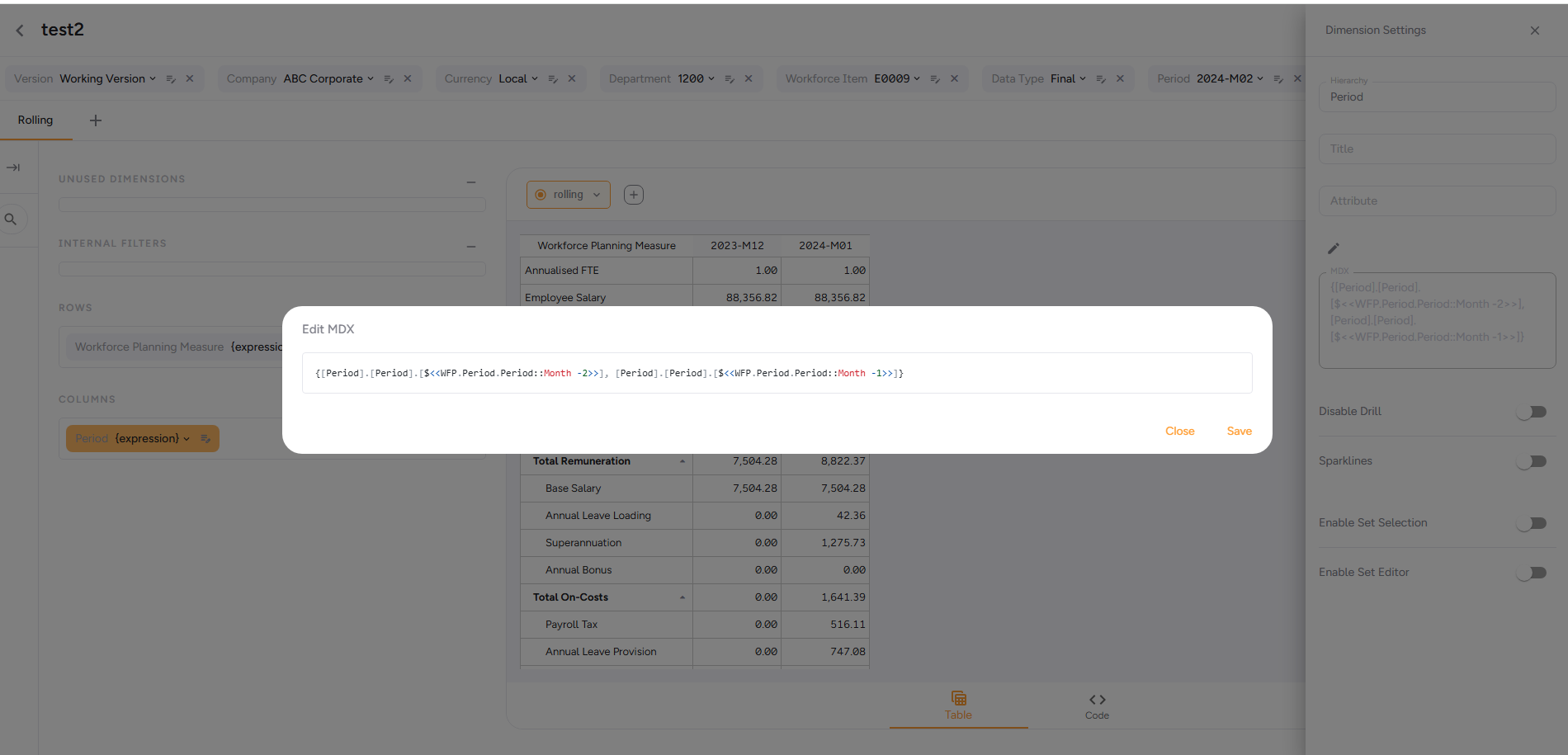
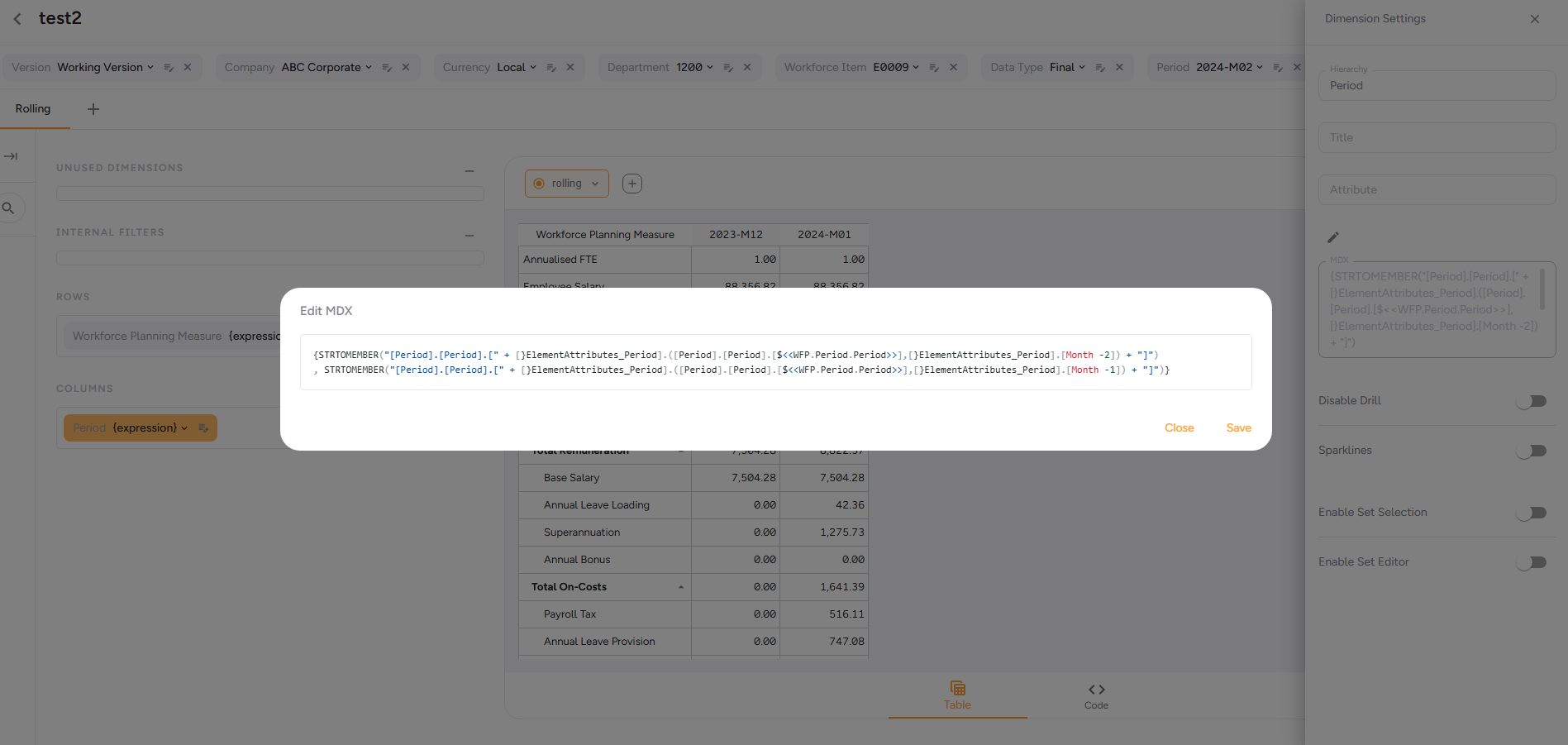
I can’t speak to your specific version but using UX NextGen 2026.02, there are at least 3 ways to do this.
Using “LastPeriods” function, if your period dimension has the periods in order (not as robust):
Referencing attribute directly:
Referencing attribute via attribute cube:
Ronan
As has already been pointed out there are MANY potential ways to solve this in Apliqo UX.
- you could reference attributes in the column set MDX definition from the same dimension’s setting service veriable defined from the filter
- you could simply use naming convention in the MDX without needing attributes
- you could define the whole MDX as a attribute and reference this as a setting service variable in the column MDX definition
My preferred way to meet this requirement given that your month dimension is in yyyymm format would be to use a MAT (moving annual total) rollup defined for each leaf element. Hopfully in any Cubewise built model a Year-Month dimension will always have YTD, YTG and MAT rollups already!
So your MAT rollup defintion might look like either defintion bellow. (Sometimes MAT might be called “last twelve months” LTM).
|
|
|
|
OR |
|
|
|
| 202603 MAT |
|
|
|
|
|
202603 MAT |
|
|
202503 YTG |
|
|
|
|
|
202504 |
|
|
202504 |
|
|
|
|
202505 |
|
|
202505 |
|
|
|
|
202506 |
|
|
202506 |
|
|
|
|
202507 |
|
|
202507 |
|
|
|
|
202508 |
|
|
202508 |
|
|
|
|
202509 |
|
|
202509 |
|
|
|
|
202510 |
|
|
202510 |
|
|
|
|
202511 |
|
|
202511 |
|
|
|
|
202512 |
|
|
202512 |
|
|
|
|
202601 |
|
202603 YTD |
|
|
|
|
|
202602 |
|
|
202601 |
|
|
|
|
202603 |
|
|
202602 |
|
|
|
|
|
|
|
202603 |
|
|
|
|
|
And the MDX to return the selected month and the trailing 11 months before would simply be:
{Descendants([month].[month].[20603 MAT], [month].[month].Levels.Count, LEAVES)}
And the MDX definition for the months to display in the column dimension in Aliqo UX would look like the following:
{Descendants([month].[month].[$<<your-instance.month.month>> MAT], [month].[month].Levels.Count, LEAVES)}
Any time the filter selection changes the setting service value will be updated and all widgets will be rebuilt / requeried. No extra button clicks. Works on all versions of Apliqo UX and TM1 server.
Thank you both, referencing attribute through attribute cube as suggested by Ronan did the trick.
I am running into another issue and it would be great if you can share your inputs regarding how to achieve the requirement.
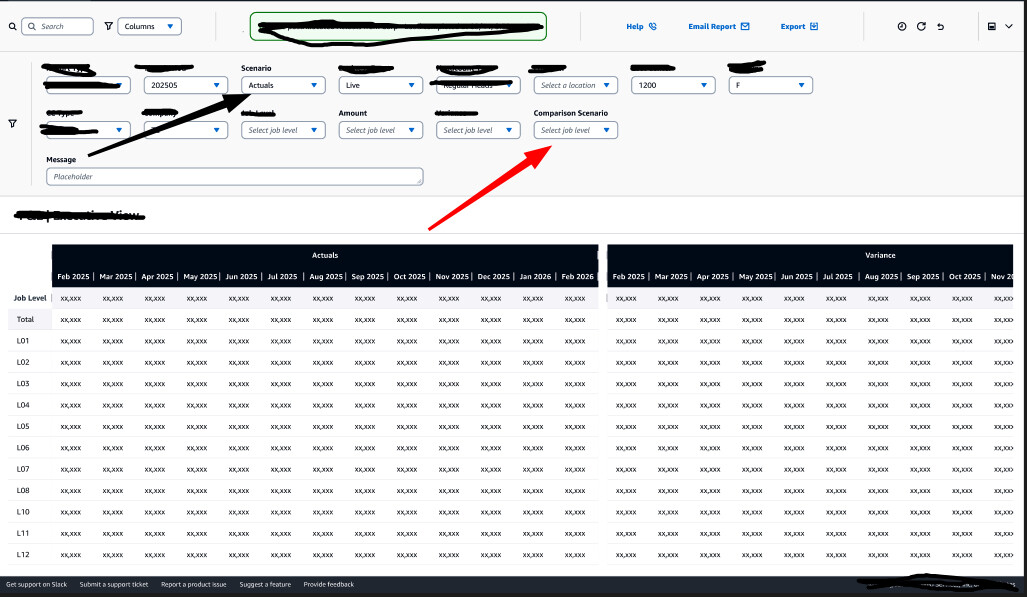
My report contains two blocks (refer attachment)
and the users would like to select scenario and comparison scenario ideally from context selection menu and the report should render data for the current month and the trailing 11 months basis the selection made, the first block should show data for the scenario selected in scenario selection and the second block should reflect data for the comparison scenario selection.
I tried to achieve this in few different ways
Cross Join with Same Dimension in Columns
-
Attempted MDX: {time_monthly} * {[scenario].[scenario].[Actuals]}, {time_monthly} * {[scenario].[scenario].[Plan]}
-
Result: Error - “Dimension scenario already included in the view” (rte 33)
-
Reason: Scenario appears in both column cross join and WHERE clause
2. Created Separate Physical Dimension (scenario_trend_view)
-
Created new dimension as copy of scenario
-
Attempted to use in column MDX
-
Result: Error - “scenario_trend_view: Dimension not in cube” (rte 29)
-
Reason: Would require rebuilding cube structure and data migration (not feasible)
3. Created Alternate Hierarchy (trend_comparison_scenario)
-
Created alternate hierarchy on scenario dimension via TI process
-
Added elements: scenario1, scenario2, scenarioN
-
Attempted MDX: {time_monthly} * {[scenario].[trend_comparison_scenario].[element]}
-
Result: Error - “Dimension scenario:trend_comparison_scenario already included in the view” (rte 33)
-
Reason: TM1 treats alternate hierarchies as same dimension, causing conflict with WHERE clause
4. Widget-Level Dimension Configuration
-
Attempted to configure scenario at widget level (not context level) with different Key field values
-
Amount widget Key: reporting_system.scenario.scenario
-
Variance widget Key: reporting_system.comparison_scenario.scenario
-
Result: Changes to one widget’s dimension configuration affected both widgets
-
Reason: Widgets appear to share dimension configuration objects
5. Context-Level Configuration
-
Both “Scenario” and “Comparison Scenario” exist as context members at dashboard level
-
Both reference the scenario dimension
-
Result: Context dimensions are dashboard-level and affect all widgets globally
-
Reason: Cannot achieve widget-specific scenario selection through context alone
Current Configuration:
-
Two widgets: Amount and Variance
-
Both use identical time_monthly column MDX with 12 trailing months using StrToMember and Prior attributes
-
Both widgets share dashboard-level context for time_monthly
-
Need independent scenario selection per widget
Desired Outcome:
Users select:
-
Scenario: Actuals → Amount widget displays Actuals data
-
Comparison Scenario: Plan → Variance widget displays Plan data
-
time_monthly: 202507 → Both widgets show trailing 12 months from 202507