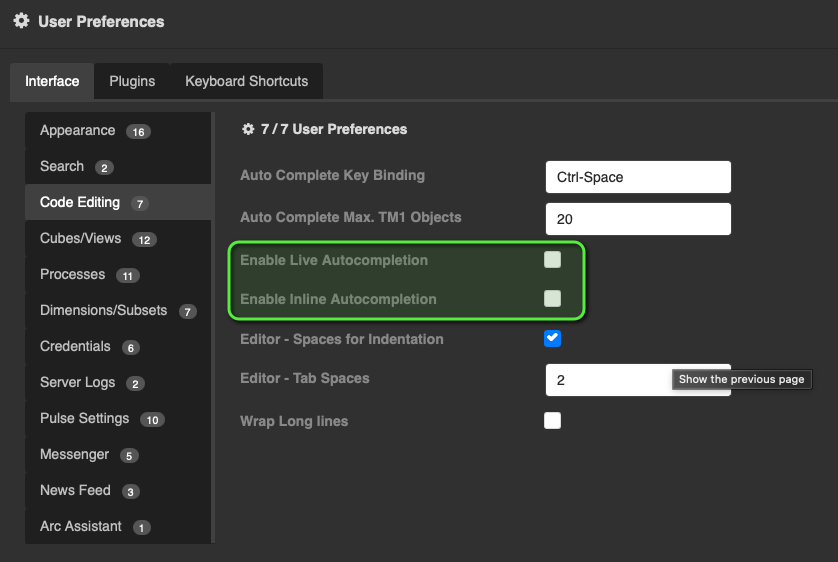
And there is no way that I can find to turn it off. Is anyoine else having the same issues? This is what the What’s New in 5.2 has to say:
Arc Auto-Complete Improvements:
Enhanced code editor with smarter, context-aware suggestions for a better coding experience.
I’m sure that this was meant with all the best intentions, but the over-aggressiveness of the auto-complete is driving me around the twist.
Example: In a rule, I want to have 1 as the returned value. This is what happens when I type 1:
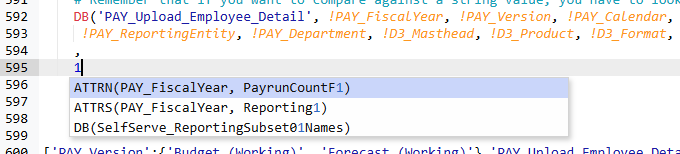
Arc searches through the entire model and finds anything, anywhere, with the character “1” in it. And unless I hit [escape] before I hit [Enter], then boom, the “true” value of 1 in my formula is replaced with an iron clad, guaranteed syntax error.
Or take this one, where I’m writing an explanatory comment which ends one line with the word “or”. This one is even worse.

There is only one object that it can find with the letters “or” in it, so it doesn’t even give any visual indication that it is going to do an auto-complete. It just DOES it. Thus the word “or” is replaced with the dimension name “!RepORtingEntity”, and yes, it’s a safe bet that I was NOT planning to use that, rather than the.word “or” as the conjunction.

Sure, that’s “just” a comment, but it does the same thing inside rule code as well.
Here’s another example. I had a CellGetS statement pulling a value. In a certain case I want to write a new value back to the same location. So I copy the CellGetS line, paste it, and then go to edit it to turn it into a CellPutS. What happens? THIS happens:

So rather than a simple couple of characters of editing, I have to clear off all of the forced autocorrect content to make sure that it doesn’t screw up my code. Spoiler alert… it did anyway, so what should have been 5 characters of typing blew out to about 30 to fix it.
This here is why Microsoft requires you to consciously select Intellisense text or hit [Tab] on it; that way nothing goes in without your explicit say-so, whereas in Arc 5.2 you have to remember to hit [Escape] to AVOID unwanted replacement content going in. That’s even in cases where you never see that there IS replacement content like ther Autocomplete02 and 03 examples above.
I for one would like to see an option along the lines of “Only insert autocomplete on selection”.