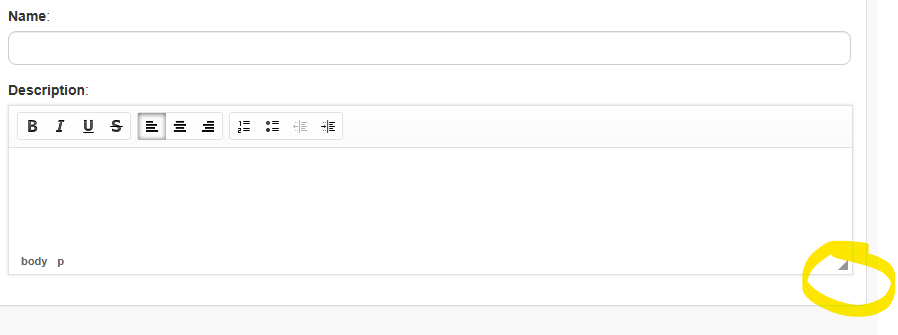
It is one of those difficult to reproduce “random” bugs (that we all hate as developers but as users we hate even more).
Sometimes you get to the last step of creating a migration package but after entering a package name no matter what you do the description field stubbornly refuses to be selected and allow text entry. Thus the package doesn’t let itself be saved and you find yourself in a stalemate.
When this happens it’s of course super annoying as a user to need to try starting from scratch and lose all the work of creating the package.
It would be great if Pulse had a button or checkbox next to the name field that allowed the name to be copied to the description to avoid this situation!!!
Have you try to use Tab? It would actually take you to the Description field thou, sometimes using the mouse just not able to click to the placeholder.
We are experiencing the same behaviour or issue now in PULSE - v7.2.1, ARC - 5.2.1 and Slice - v5.2.1.
Same behaviour is happening in Slice and ARC while creating the migration package.
We’re seeing the same “Description field not writeable” behaviour across Pulse, Arc, and Slice when creating a migration package.
Versions impacted
Pulse: v7.2.1
Arc: v5.2.1
Slice: v5.2.1
Pulse – steps to reproduce
Log in to Pulse
Go to Migration
Create Package
Select Environment → Next
Select Source (Source Control or All) and select an Instance → Next
Select the Changes → Next
Select Dependencies → Next
On the final step (Description screen):
Set Package type = Live Update
Enter Name
Attempt to click into Description and type
Observed: Description field can’t be focused/selected, so no text can be entered and the package can’t be saved. Expected: Description field should accept input normally.
note - we closed the browser and logged in again then also it did not work for some developers.
Workaround: Clearing browser cookies/site data (for the Pulse URL) resolves it temporarily.
Arc – steps to reproduce (Pulse integration path)
Open Arc
Select Group
Select Instance
Log in to the instance via Gateway
Select Processes
Select any process
It prompts to log in to Pulse again (likely due to being logged out after some time; required for Pulse integration)
Click Migrate and follow the same migration wizard steps as in Pulse
At the final step, the Description field is not editable (same symptom)
Slice – steps to reproduce
We performed the same test in Slice (migration package creation via Pulse integration) and saw the same issue: Description field not available / not editable.
Question: Is this a known defect, and has it been fixed in a later Pulse/Arc/Slice release? If so, which version contains the fix (or is there a recommended workaround beyond clearing cookies)?
We have not been able to consistently replicate/see it yet. In the meantime, this is an alternative that might help should users encounter it: Resize that text box by dragging this,