Hey everyone,
As many of you may be aware, from Apliqo UX 2025 or newer (i.e. React Gen, Next Gen, Latest, etc  ) the Content Store database is in a MongoDB container, there is no need for a dedicated TM1 instance for the CS any longer.
With that, for on-prem deployments, there is a need for Backing up the CS, to be on the safe side of things, in case anything goes wrong.. This is what I want to share on this post!
Before I begin, It is worth mentioning that there is a way of exporting/importing Apps from the UX UI Settings, but that only covers the Reports, and there is no way to schedule it, so it is more for migration of Reports between environments.
The CS in mongodb, contains all the Apps, Snippets, Users and Groups, Tasks scheduler, AVA Ai settings, etc..
Backup of Apliqo UX Content Store
Install MongoDB database tools
To back up the UX Content store, you will need first to download the MongoDB tools, to use mongodump and mongorestore.
Go to Mongodb website and download it for your platform: https://www.mongodb.com/docs/database-tools/installation/?operating-system=linux&package-type=deb
Follow the instructions below to install it:
-
Go to mongodb download center: https://www.mongodb.com/try/download/database-tools
-
Select Platform and in case of linux, deb file and Copy the link url.
-
Download the file from the url, into any director
sudo wgethttps://fastdl.mongodb.org/tools/db/mongodb-database-tools-ubuntu2404-x86_64-100.14.1.deb -
Go to where the deb file is located and install it, command line below
sudo apt install ./mongodb-database-tools-ubuntu2404-x86_64-100.14.1.deb -
The mongodb database tools will be located on the /usr/bin/
Or make the adjustments so it is available to everyone -
You can now use the tools directly via command line
a. mongodump for backup of DB
b. mongorestore for restoring a collection or the full directory db
Backup Script and Scheduling
To make it easier and better for doing backup I have created a .sh script, which can be re-used anywhere, just changing the Parameters.
- Create a new folder for holding the UX CS backups under the “ApliqoUX” dir. For example on the /Apliqo/ directory, create a folder named “backups_mongodb_cs”.
sudo mkdir backups_mongodb_cs - Go to the /Apliqo/scripts/ directory, and create a .sh file, for example: mongodb_cs_backup.sh and copy/paste the code below, edit details of your environment.
#!/bin/bash

# Define backup destination directory with a timestamp
BKP_DIR_PREFIX="ux_cs_mongodb_"
BKP_DIR="/Apliqo/backups_mongodb_cs/"
BKP_KEEP_DAYS=30

DEST_DIR="$BKP_DIR$BKP_DIR_PREFIX$(date +\%Y-\%m-\%d_\%H-\%M)"

echo "$DEST_DIR"

# MongoDB connection details
HOST="localhost" # server name
PORT="27082" # mongo DB Expose port on .env
DB_NAME="apliqo-content-store"
DB_USER="root" # user on .env file
DB_PASS="<pwd on .env file>" # Password on .env file
AUTH_DB="admin" # Usually 'admin' for authentication

# Create the destination directory
mkdir -p "$DEST_DIR"

# Run mongodump
mongodump --host "$HOST" --port "$PORT" --db "$DB_NAME" --username "$DB_USER" --password "$DB_PASS" --authenticationDatabase "$AUTH_DB" --out "$DEST_DIR"

# Cleanup for old backups (e.g., delete backups older than x days)
find $BKP_DIR* -type d -mtime +$BKP_KEEP_DAYS -exec rm -rf {} +
- This script creates a backup of all collections of the UX Content store, and also deletes backups older than X days parameter.
- After saving the file, change the permissions to be executable, by executing:
sudo chmod +x /Apliqo/scripts/mongodb_cs_backup.sh - you can now execute the script manually:
sudo sh mongodb_cs_backup.sh
Schedule backup script for automatic execution
With the .sh script ready, just need to add it to the crontab to execute it automatically on the desired frequency.
The crontab command in Linux is used to create, edit, and manage scheduled tasks (cron jobs) that run automatically at specified times or intervals. It allows users to automate repetitive system and administrative tasks without manual intervention.
Source: https://www.geeksforgeeks.org/linux-unix/crontab-in-linux-with-examples/
-
To check if you have crontab running on Linux, execute the command below, and it should show enabled and active (running).
sudo systemctl status cron -
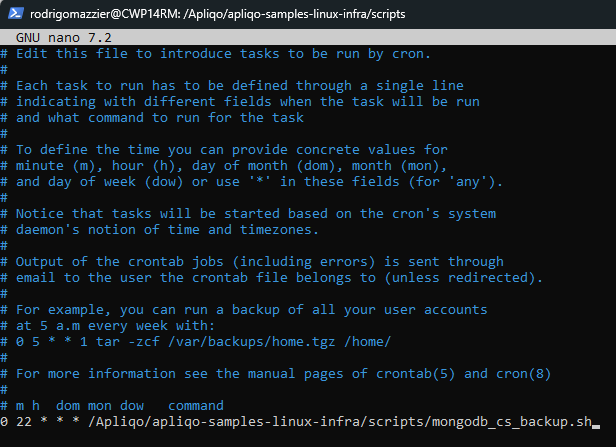
Open the crontab editor to add your script and schedule as a cron job.
sudo crontab -e -
You can easily find on the internet how the crontab schedule works, and get the results for the desired scheduling. The basic syntax for creating a new cron job is: MIN HOUR DOM MON DOW CMD
MIN = At which minute
HOUR = At which hour, 24 hr format
DOM = DAY OF MONTH
MON = MONTH
DOW = DAY OF WEEK
CMD = COMMAND LINE (with path)
-
For example, to execute the backup script at 10pm daily, it should be:
0 22 * * * /path/to/your/script.sh
-
Add the command at the end of the file, and type CTRL+X to Exit, type Y to save it.
The mongodump command creates a folder with all the Collections, you will see BSON and JSON files inside the backup dir, it contains all you need in case of a restore is needed.
Done! Now you should have backups of your UX CS!
Restore Content Store from a backup
In case you have issues or loose your CS, you can restore everything from the backup folder, with the command line below:
.\mongorestore --host "<SERVERNAME>" --port "<DB EXPOSE PORT>" --username "root" --password "<PWD ON .ENV FILE>" --authenticationDatabase admin --db "<DB NAME>" "<DIRECTORY WITH THE BACKUP>"
In case you only need to restore a specific collection within the DB, you can execute the command below:
.\mongorestore --host "<SERVERNAME>" --port "<DB EXPOSE PORT>" --username "root" --password "<PWD ON .ENV FILE>" --authenticationDatabase admin --db "<DB NAME>" --drop --collection "</path/COLLECTION NAME.bson>"
Hope this helps for your Apliqo UX implementations!
I am no expert on this part, so open to suggestions, if you have another approach or better/recommended ways of doing the mongoDB backup for UX, please just let me know!
Cheers!